LumaGrader Photo Studio: The photo studio
for your Mac.
Import, cull, edit RAW, print and shoot tethered in one free app. It works offline, and your photos never leave your Mac.
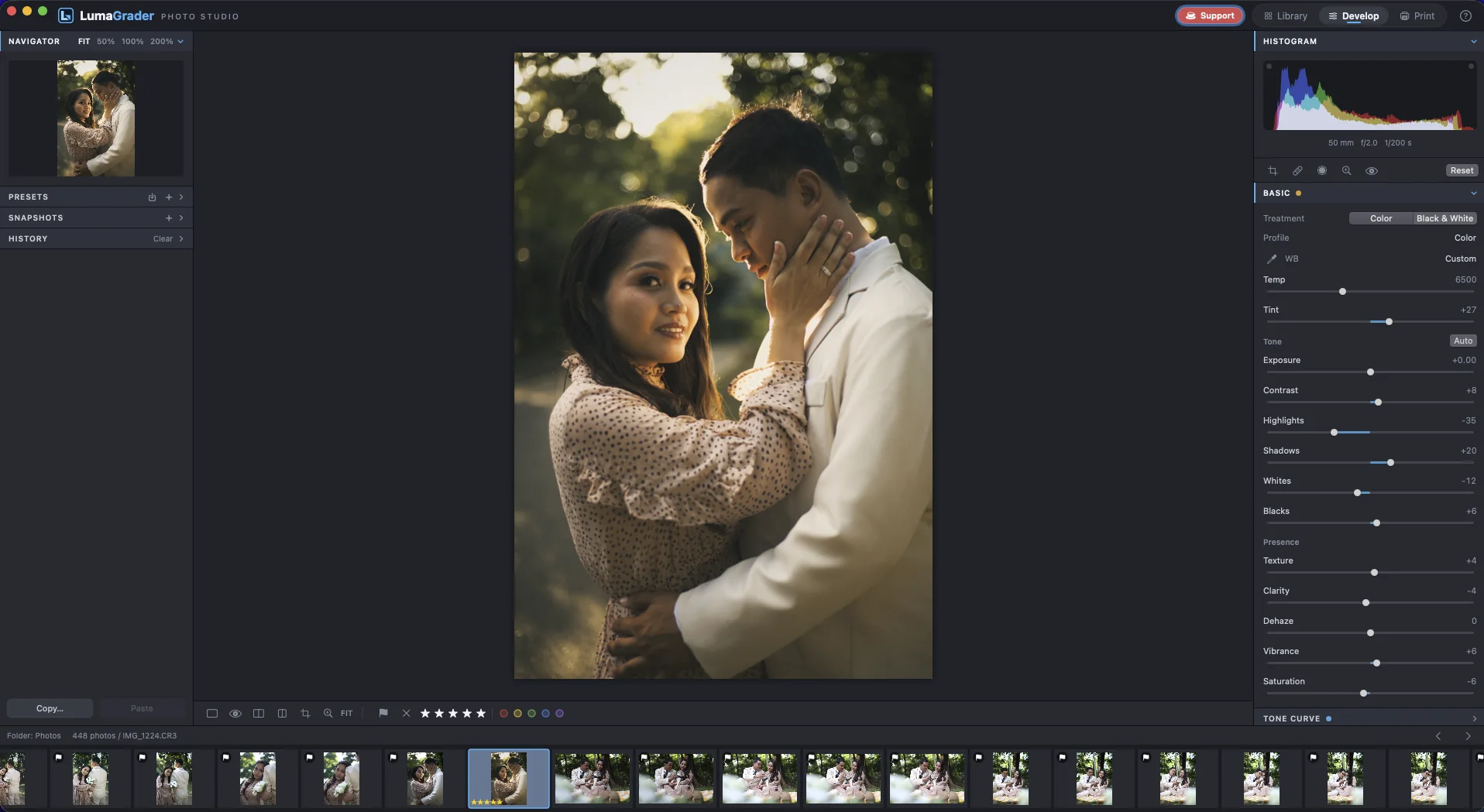
Import and cull
Get to the keepers before lunch.
Bring the whole shoot in with a backup copy, let AI Cull sweep out the misses on your own Mac, then make the real calls from the keyboard.
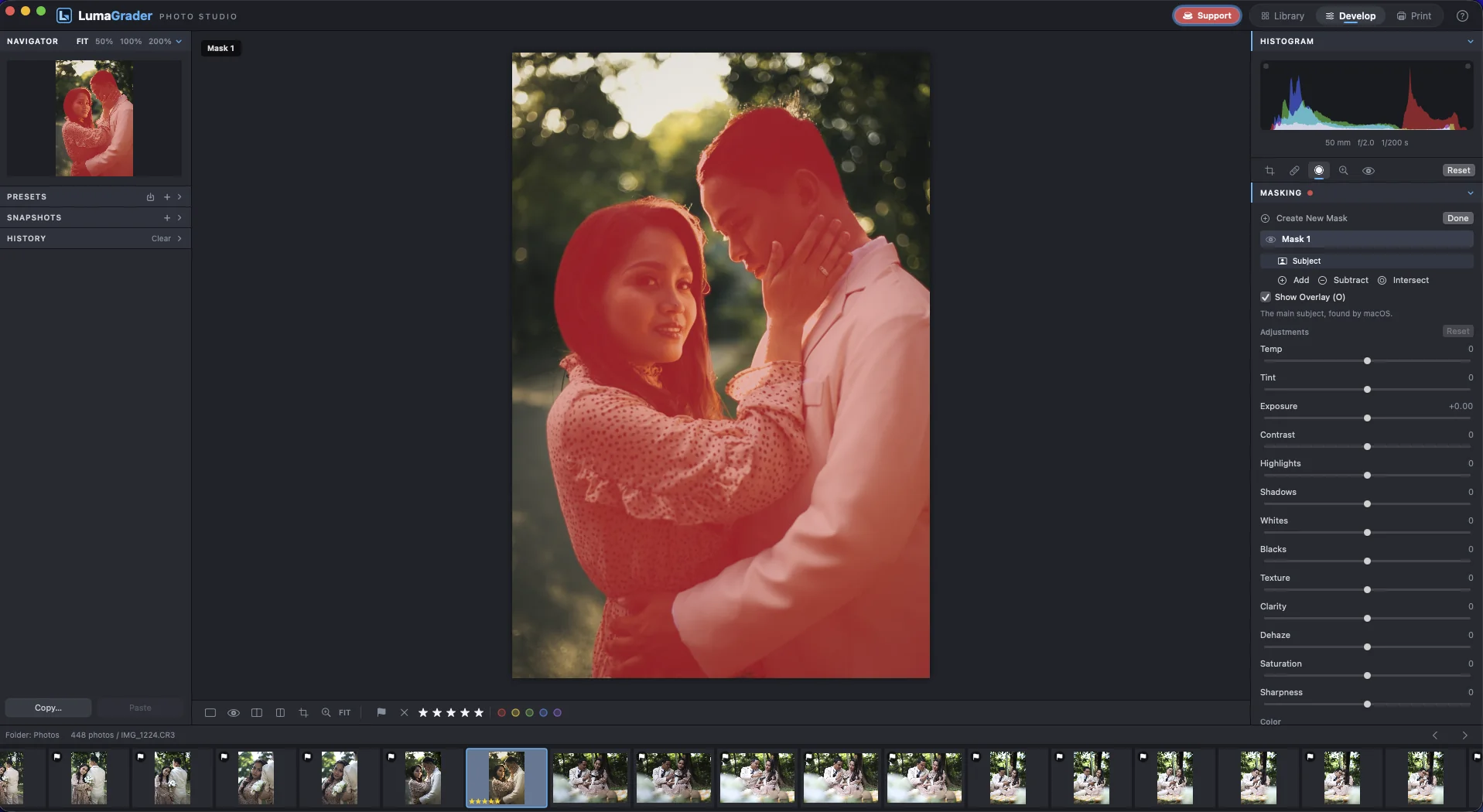
- AI Cull flags blur, closed eyes and the best of each burst
- Focus peaking and Compare / Survey for close calls
- Stars, flags and colour labels, all from the keyboard
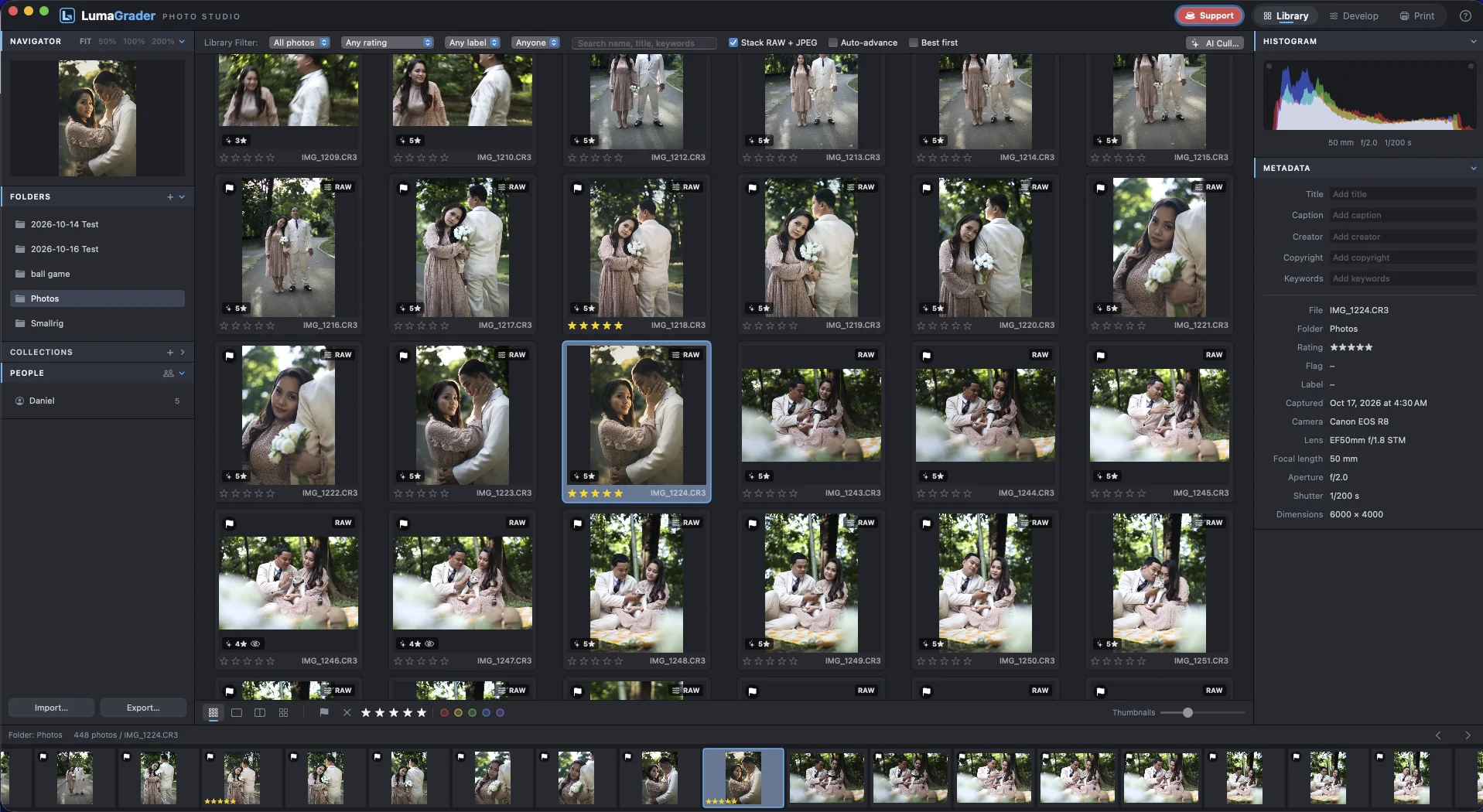
Develop
A full RAW editor, without the subscription.
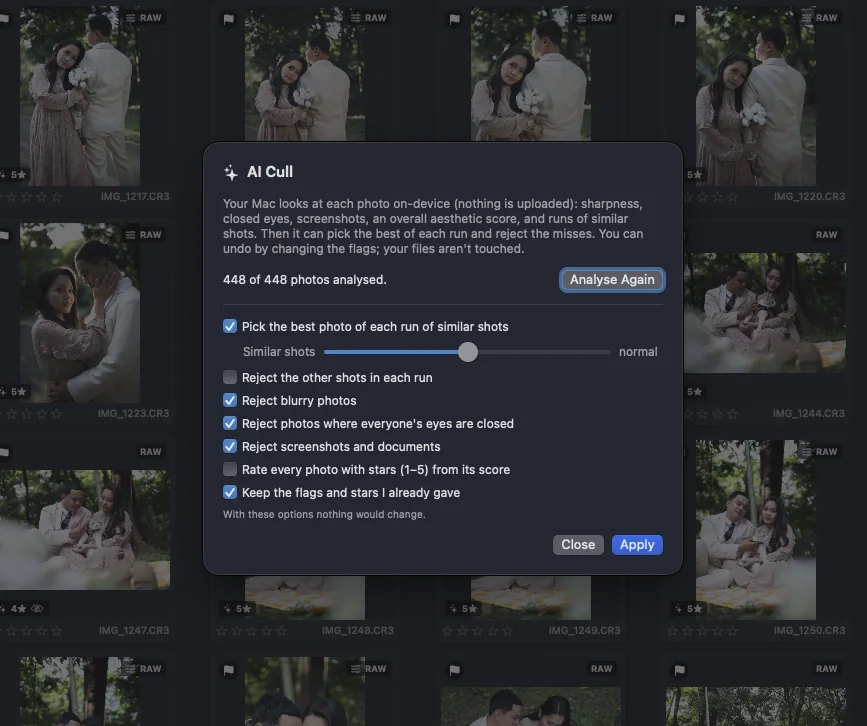
White balance, tone curve, colour grading, Select Subject masks, healing, denoise and lens blur. Edits live in the catalog; your originals are never touched.
- Select Subject and Background masks, found automatically
- Presets, Lightroom-style .xmp import and .cube LUTs
- Sync, Auto Sync and Match Total Exposures for whole sets
Export, proof and print
Deliver, let clients choose, print true to screen.
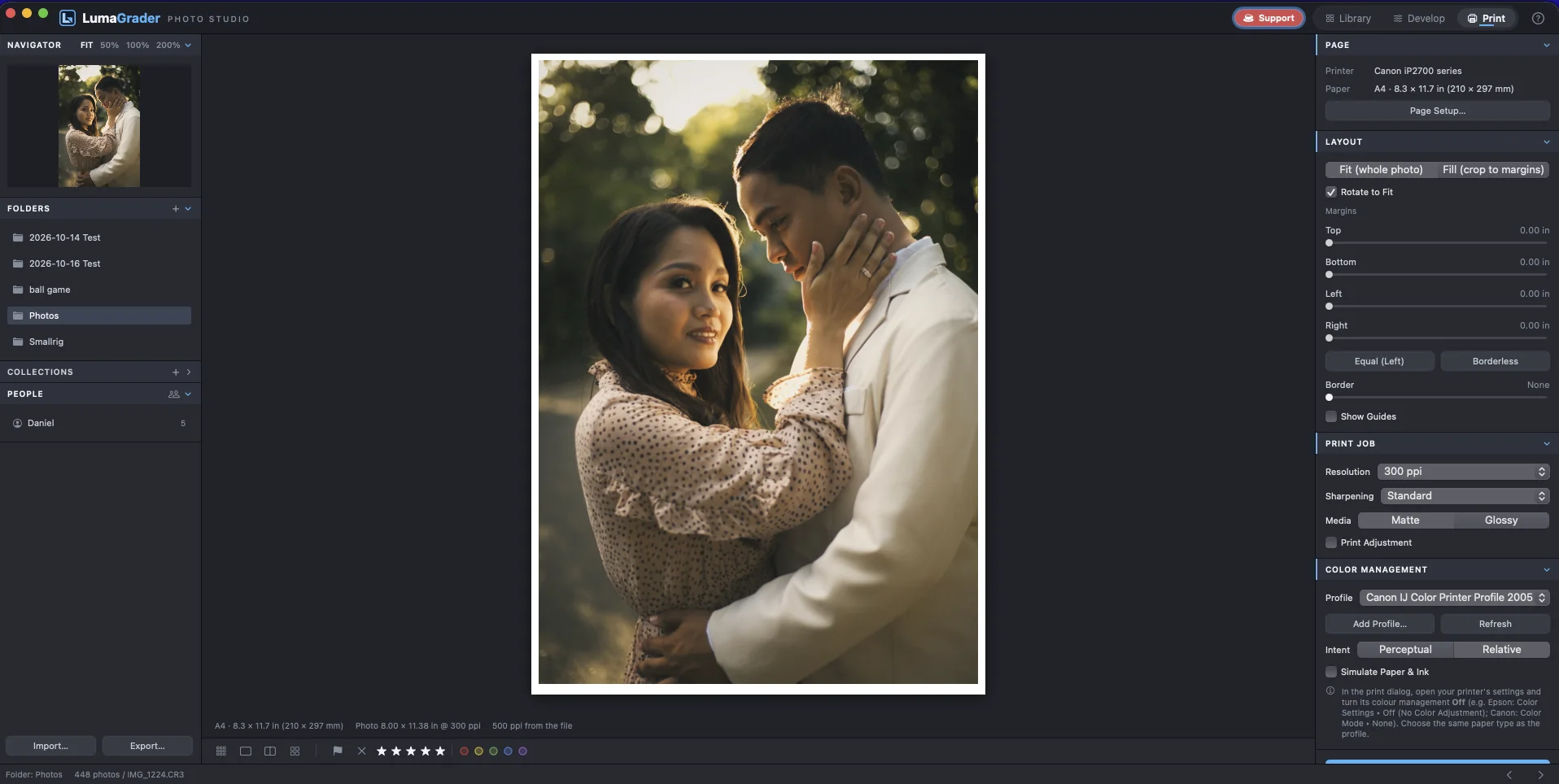
Export for clients and social media in the background, send a proofing gallery so the couple hearts their favourites, and print with your paper’s ICC profile.
- Export presets with resizing and watermarks
- Proofing gallery: hearts and notes come back as the Purple label
- ICC paper profiles with a soft proof before you print
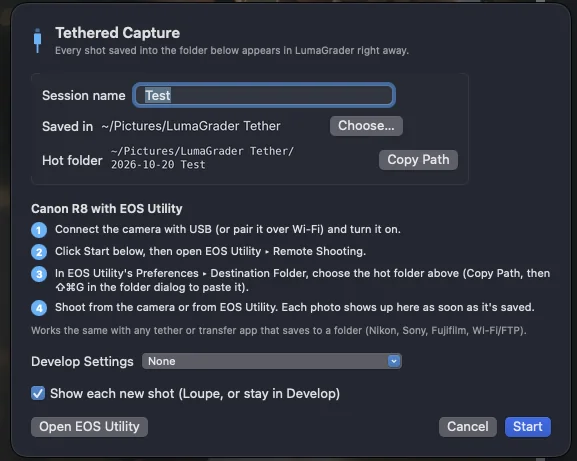
Shoot tethered
Every frame, large, the moment you take it.
Connect a Canon camera with EOS Utility and each shot appears big on screen with your look already applied. Made for studio portraits, products and events.
- Hot folder with Canon EOS Utility over USB or Wi-Fi
- Apply nothing, the previous settings, or a preset to each shot
- Auto-rotates portraits as they arrive
Everything in one window
From the memory card to the print, without switching apps or paying for another subscription.
Card import with backup
Dated shoot folders, renaming and a second copy on another drive.
AI Cull on your Mac
Flags blur, closed eyes and the best of each burst. Nothing is uploaded.
Focus Check
Focus peaking and one key to jump to the sharpest spot at 100%.
People
Faces grouped for you; show every photo of one person.
Full RAW develop
White balance, tone curve, colour mixer and colour grading.
Masks
Select Subject, Background, brush, gradients, colour and luminance ranges.
Healing and denoise
Remove spots, clean high-ISO noise, blur the background.
Presets and LUTs
Your own presets, Lightroom-style .xmp import and .cube LUT profiles.
HDR merge
Two to nine brackets into one 16-bit file, aligned and deghosted.
Export presets
JPEG, 16-bit TIFF or PNG, resized and watermarked, in the background.
Print with ICC profiles
Paper profiles, print sharpening and a soft proof on screen.
Tethered shooting
Canon EOS Utility: every frame large on screen as you shoot.
Client proofing
A small gallery clients open anywhere to heart their favourites.
Catalog backup
Back up ratings and edits daily to another drive; restore any copy.
Fully offline
No account and no cloud. Your photos never leave your Mac.
Open source
Every line on GitHub under GPL-3.0. Free now and later.
Free, and it stays yours
How LumaGrader Photo Studio compares with a typical subscription photo editor.
| Feature | LumaGrader Photo Studio | Typical subscription editor |
|---|---|---|
| Price | Free | Monthly or yearly fee |
| Account and sign-in | Not needed | Usually required |
| Works offline | Always | Often checks in online |
| Your photos stay on your Mac | Yes | Depends on the app |
| Edits after you stop paying | Always yours | May lose editing access |
| Source code you can read | Yes, GPL-3.0 | No |
Subscription apps differ; this is the common model, not any one product.
Opening it the first time
macOS shows a warning the first time you open the app. That is normal: Apple only skips the warning for apps signed with a paid developer account, and LumaGrader is shared directly by an independent developer. You confirm it once.
- Open the downloaded .dmg and drag LumaGrader Photo Studio into Applications.
- Open the app from Applications. When macOS says it could not verify it, click Done.
- Go to System Settings › Privacy & Security, scroll down, and click Open Anyway.
- Enter your Mac password and click Open Anyway again. From now on it opens normally.
If macOS says the app is damaged, it's the same check worded differently. Paste this in Terminal, press Return, then open the app:
xattr -dr com.apple.quarantine "/Applications/LumaGrader Photo Studio.app"
On macOS 14 Sonoma you can instead right-click the app in Applications and choose Open.
Still stuck? Email [email protected].
Questions
The short answers. Anything else, email [email protected].
Is LumaGrader Photo Studio really free?
Yes. There is no trial, no subscription and no paid version. It is open source under the GPL-3.0 license. If it helps your work, you can support it on Ko-fi.
Why does macOS warn me the first time I open it?
Apple only skips that warning for apps signed with a paid developer account. LumaGrader is shared directly by an independent developer, so you confirm it once in System Settings › Privacy & Security › Open Anyway. The steps are below.
Which cameras and RAW files does it support?
It uses the RAW support built into macOS, which covers most cameras from Canon, Nikon, Sony, Fujifilm, Panasonic, Olympus/OM System, Leica and others, plus DNG, JPEG, HEIC, TIFF and PNG. It is developed and tested daily with a Canon EOS R8.
Does it change my original photos?
No. Ratings, labels and edits live in a catalog file on your Mac. Your original files are only read. The only exception is Delete Photo › Move to Trash, which asks first.
Can I use my Lightroom presets?
You can import Lightroom-style .xmp presets and .cube LUT profiles. Most basic, tone, colour and detail settings carry over; a few tools work differently, so check the first photo.
Is there a Windows or iPad version?
Not yet. Photo Studio is for macOS 14 Sonoma or newer, on Apple silicon or Intel. On a phone or PC you can use the free LumaGrader web editor in your browser.
Does it need the internet?
No. Everything, including AI Cull and Select Subject masks, runs on your Mac with Apple’s frameworks. The internet is only used when you open a link, like this website.
Free and open source
The full source code is on GitHub under GPL-3.0. Read it, build it, report a bug or suggest a feature. If the app saves you time, a coffee on Ko-fi keeps it going.
On a phone or a PC?
The LumaGrader web editor runs in any browser with no install. Projects and presets you saved there before are still there.
Your next shoot, start to finish.
Free for Mac. macOS 14 Sonoma or newer.
Download for Mac